
What is Booklet Creep? (Shingling Explained)
Understand the physics of folded paper sheets, calculate spine creep for thick booklets, and apply shingling compensation to keep your margins perfectly aligned.
What Is Booklet Creep?
Booklet creep (shingling) is the outward shift of inner pages in a folded saddle-stitched booklet caused by paper thickness. Each nested sheet pushes the pages inside it further past the trim edge. For booklets over 24 pages, prepress creep compensation shifts inner-page content toward the spine so margins stay even after trimming.
What Causes Booklet Creep?
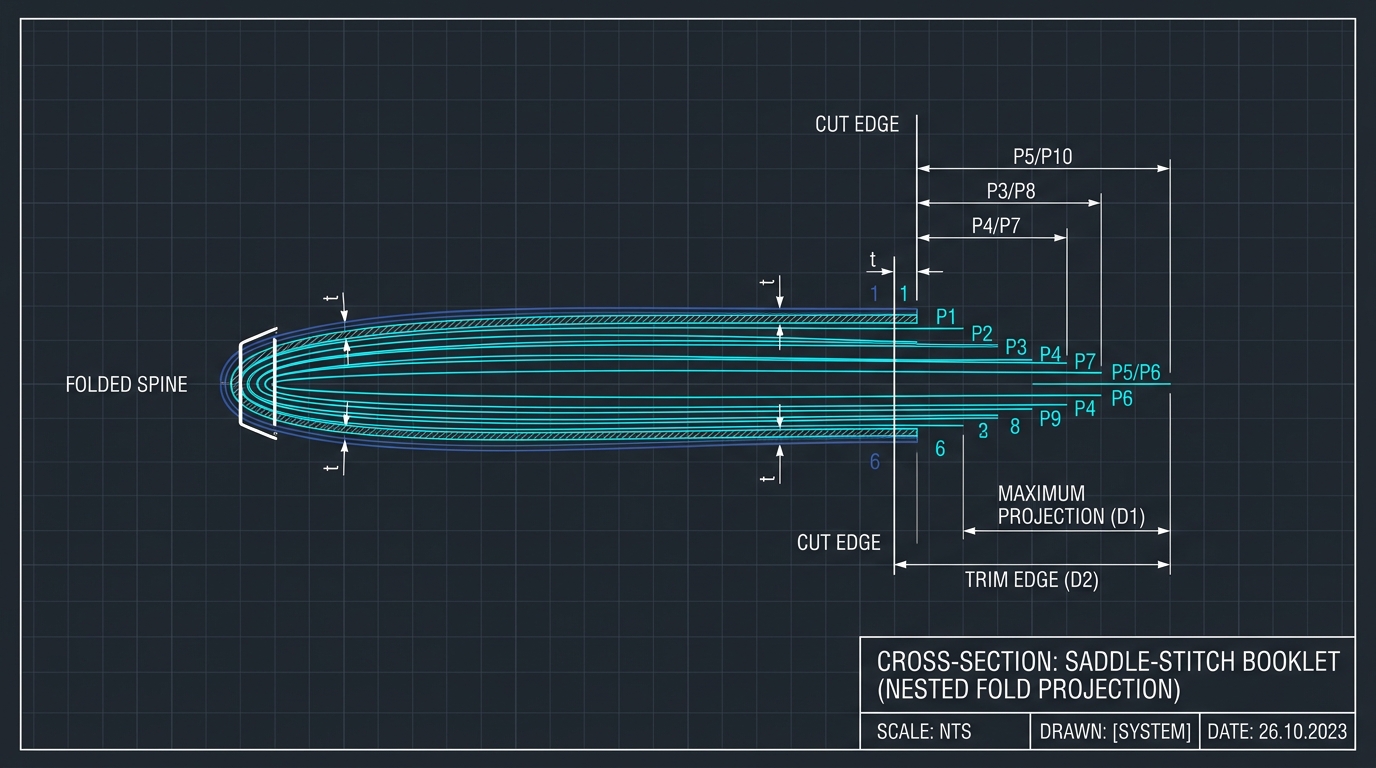
In saddle-stitched (folded and stapled) booklets, sheets of paper are nested one inside another before folding along the center spine. Because paper has a physical thickness (called paper caliper), each successive sheet must wrap around all the sheets inside it.
As a result, the innermost pages are physically pushed outward beyond the edge of the outer cover. This geometric offset is known in the printing industry as Booklet Creep (or Shingling / Push-out).
What Happens If You Ignore Creep?
- Uneven Outer Margins: After the booklet is trimmed flat with a guillotine cutter, the outer margins on inner pages will be significantly narrower than the margins on the cover.
- Text & Running Headers Cut Off: Page numbers, folio headers, or decorative borders near the outer trim edge may get sliced off entirely on central spreads.
- Misaligned Cross-Spread Spreads: Two-page photo spreads will have a visible jump at the gutter fold.
How to Calculate Total Booklet Creep
The total amount of creep displacement depends on two factors: the number of sheets in the signature and the thickness (caliper) of each sheet.
Where Total Sheets = Page Count ÷ 4. For example, a 32-page booklet printed on 0.12mm paper has 8 sheets:
(8 - 1) × 0.12mm = 0.84 mm of total edge displacement.
Standard Paper Caliper Reference Table
Use this quick reference table to find the caliper thickness of standard commercial paper stocks:
| Paper Stock | Metric Basis | Thickness (Inches) | Caliper (Millimeters) | 32-Page Creep |
|---|---|---|---|---|
| 20# Standard Copy Paper | 75 GSM | 0.0038" | 0.097 mm | ~0.68 mm |
| 24# Premium Text Paper | 90 GSM | 0.0048" | 0.122 mm | ~0.85 mm |
| 70# Uncoated Book Text | 104 GSM | 0.0052" | 0.132 mm | ~0.92 mm |
| 80# Gloss Coated Text | 118 GSM | 0.0038" | 0.096 mm | ~0.67 mm |
| 100# Heavy Silk Text | 148 GSM | 0.0060" | 0.152 mm | ~1.06 mm |
How PDF to Booklet Imposition Fixes Creep
Commercial prepress software fixes creep through inner shift shingling. Rather than forcing you to redesign every page in InDesign, PDF to Booklet adjusts the coordinate placement on each imposed sheet during rendering:
Inner Shingling (Gutter Shift)
Outer sheets remain unchanged. Inner sheets are smoothly shifted inward toward the spine by fractions of a millimeter. When the final booklet is trimmed, all outer margins match the cover perfectly.
Zero Distortion or Scaling
Unlike crude tools that shrink inner pages non-proportionally, PDF to Booklet performs pure vector translation so your typography, aspect ratios, and line weights stay 100% crisp.
Prepress Rule of Thumb
- Under 16 Pages: Creep is negligible (< 0.3 mm) and usually does not require compensation unless margins are ultra-tight (< 5mm).
- 20 to 48 Pages: Creep is noticeable (0.5 mm - 1.5 mm). Always set creep compensation in PDF to Booklet settings.
- Over 64 Pages: Saddle-stitching becomes impractical because the spine will bulge excessively. Switch to Perfect Binding with multi-signature imposition.